
Table of Contents
- What a Lumbar Support Cushion Does for Your Lower Back
- How to Choose the Best Office Desk Lumbar Support Cushions for Back Pain
- Best Lumbar Support Pillow for Office Chair: Fit and Adjustability
- Our Picks: Lumbar Support Cushions and Belts Compared
- Portable Lumbar Support for Office Chairs: Travel and Shared Desks
- Setting Up Lumbar Support for Long Hours of Sitting
- Choosing Your Lumbar Cushion and Ordering From AP Retail Mart
- Frequently Asked Questions
Last Updated: November 8, 2026
AP Retail Mart puts a lumbar support cushion on a desk chair in the simplest possible way: it sits in the small of your back and holds your spine in a neutral curve while you work. If you sit for long stretches, a well-chosen cushion can make the difference between finishing the day stiff and finishing it comfortable. This guide compares lumbar products so you can see which one fits your chair and your work pattern.
Lumbar support cushions and belts are not the same product, and the right choice depends on where you sit and how long you sit there. Some attach to a chair, some wrap around your waist, and some are built for travel. We walk through each category below and point to the specific products we carry.
What a Lumbar Support Cushion Does for Your Lower Back
A lumbar support cushion fills the gap between your lower back and the chair backrest. Most office chairs have a flat or slightly concave back, and that shape does not match the natural inward curve of the lumbar spine.
A cushion pushes the lower back gently forward, so the spine stays closer to its natural curve. It does not fix a medical problem on its own. If you have persistent or worsening pain, a doctor or physiotherapist should look at it.
How to Choose the Best Office Desk Lumbar Support Cushions for Back Pain
Choosing a lumbar cushion is not about finding the softest or most expensive product, it is about matching the cushion's shape, firmness, and attachment method to your chair and your body.
Start with your chair's backrest. Measure the height from your seat pan to the point where your lower back curves inward (usually 6 to 10 inches above the seat). A cushion should sit in that hollow without pushing your shoulders forward or sliding down. If your chair has a tall, flat backrest, look for a cushion with adjustable straps that let you set the height. If your chair has a low backrest that ends below your shoulder blades, a thinner cushion (2 to 3 inches thick) prevents your upper back from being pushed into an awkward forward lean.
Consider your torso length and seat depth. Petite users (under 5'4") often find that thick lumbar cushions reduce usable seat depth, forcing the knees higher than the hips. In that case, choose a slim cushion (1.5 to 2 inches) or a belt-style support that does not occupy seat space. Tall users (over 6'0") may need a taller cushion that extends higher up the lumbar spine, or a cushion with a vertical adjustment range of at least 3 inches. A common pattern is to test the cushion for a full workday and check whether your feet remain flat on the floor and your thighs are supported along their full length.
Match firmness to your comfort. Firm memory foam (high density, slow rebound) keeps the spine aligned but can feel intrusive for some people. Softer foam or gel-infused cushions feel more forgiving at first but may compress over a 6- to 8-hour day. A medium-firm cushion with a contoured shape (a slight inward curve that mirrors the lumbar lordosis) can balance support and comfort. Watch out: a cushion that feels perfect for the first hour may become uncomfortable by hour four if the foam bottoms out, check for a density rating of at least 2.5 pounds per cubic foot if the specification is available.
Decide between chair-mounted and body-worn support. A chair-mounted cushion stays in one place and suits a fixed desk setup. A belt or brace moves with you and suits shared desks or frequent standing. Chair-mounted cushions provide consistent passive support without the need to adjust straps each time you sit. Body-worn belts add compression, but they are not a substitute for a cushion that corrects the chair's shape.
Check attachment and stability. Straps that wrap around the backrest should be long enough for your chair's width (most office chairs are 18 to 22 inches wide). A non-slip backing or a strap with a buckle prevents the cushion from migrating during the day. If your chair has a mesh back, avoid cushions with smooth nylon covers that slide easily; look for textured or rubberized grip panels.
Finally, treat the cushion as one part of an ergonomic setup. No cushion can compensate for a seat height that leaves your feet dangling or a monitor that forces your neck forward. Use the cushion to support your lumbar curve, then adjust your chair height, footrest, and screen position so your ears, shoulders, and hips stack vertically. If discomfort persists or worsens, stop using the cushion and consult a healthcare professional.
Best Lumbar Support Pillow for Office Chair: Fit and Adjustability
For a fixed office chair, look for a lumbar pillow that adjusts in height and holds its position. The main points to check are:
- Fit: the pillow should cover the lower back without reaching the shoulder blades.
- Adjustability: straps or a clip that let you move the cushion up or down.
- Stability: a non-slip backing so the pillow does not shift during movement.
- Breathability: a mesh or breathable cover keeps you cooler through long sessions.
A pillow that fits your chair and stays put will serve you better than a premium product that slides out of place. Measure the backrest height before you buy if you can.
Our Picks: Lumbar Support Cushions and Belts Compared
We carry two products that suit most office desk users who want lower back support. Here is how they compare.
| Product | Starting Price | Type | Best For |
|---|---|---|---|
| Double Pull Lumbar Support Belt | $16.29 | Adjustable belt | Firm, adjustable compression while sitting or lifting |
| Unisex Posture Corrector Back Brace | $9.90 | Adjustable brace | Everyday posture support under clothing |
Double Pull Lumbar Support Belt
The Double Pull Lumbar Support Belt uses adjustable double pull straps to set the level of compression. It offers firm, customisable support in the lower back, suited to sitting and lifting. At $16.29, it is one of the more affordable options in our lumbar range. The trade-off is that it wraps around your waist rather than sitting on the chair, so it suits people who want support that moves with them.
Best for: people who want adjustable compression and move between sitting and standing tasks. Skip if: you want a cushion that stays fixed on the chair.
Shop the Double Pull Lumbar Support Belt

Unisex Posture Corrector Back Brace
The Unisex Posture Corrector Back Brace is made from breathable nylon and fits under clothing, so it can be worn during the workday without drawing attention. It is available in four colours and sizes S to XXXL, with 1PC or 2PCS options. At $9.90, it is the lowest-cost product in this comparison. It is aimed at posture, particularly shoulder rounding. Wear it in short sessions as you get used to it.
Best for: everyday posture support and people who want something discreet. Skip if: your main issue is lower back support rather than posture.
Shop the Unisex Posture Corrector Back Brace
Portable Lumbar Support for Office Chairs: Travel and Shared Desks
If you work at different desks, travel often, or share an office chair, a portable option makes more sense than a permanent cushion. A belt-style product moves with you and does not need to be re-fitted each time you sit down.
The Long Wave Red Light Therapy Heating Waist Belt is lightweight, has adjustable fit, and comes with an external remote control. It comes in blue and black and includes power adapters for US, UK, European and Australian gauge adapters. At $90.48, it is aimed at people who want heat as well as support.
Explore the Long Wave Red Light Therapy Heating Waist Belt

Setting Up Lumbar Support for Long Hours of Sitting
A lumbar cushion only works as part of a complete ergonomic setup. Placing it correctly is the first step, but seat height, foot position, screen distance, and movement breaks determine whether the cushion actually reduces strain or just shifts it to another part of your body. This section walks through a practical setup you can replicate at any desk.
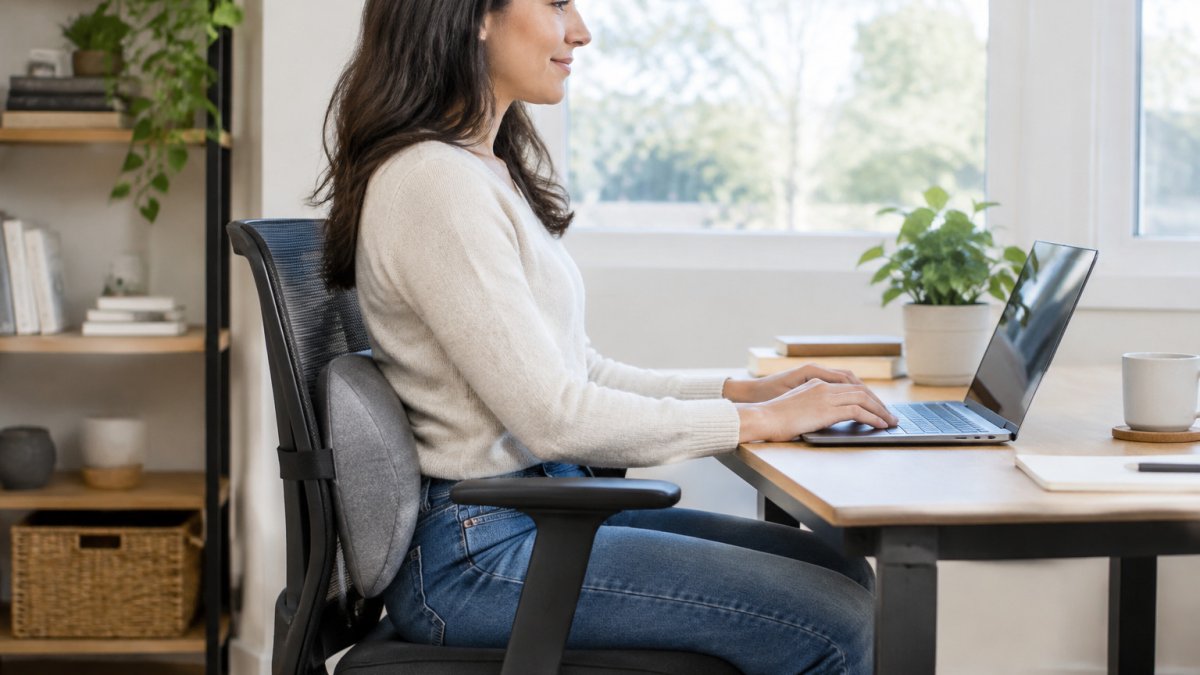
Position the cushion first. Sit fully back in your chair, then slide the cushion into the hollow of your lower back, roughly at belt-line height or slightly above. It should fill the gap between your spine's inward curve and the chair back without pushing your shoulders forward. If the cushion has straps, tighten them so the cushion stays in place when you lean back. Watch out: placing the cushion too low (at the sacrum) tilts your pelvis backward and rounds your lower back, which defeats the purpose.
Set seat height and foot placement. Adjust your chair so your feet rest flat on the floor and your knees are level with or slightly below your hips. If your feet dangle, add a footrest; if your knees rise above your hips, lower the seat or add a cushion to the seat pan (but note that a thick seat cushion changes the effective height of your lumbar support). A common pattern is to set seat height first, then re-check the lumbar cushion's position, because changing height alters where the cushion contacts your back.
Adjust screen and keyboard position. Your monitor's top edge should be at or slightly below eye level, about an arm's length away (20 to 30 inches) (Working safely with display screen equipment). Your keyboard should sit so your elbows are bent at roughly 90 degrees and your wrists are straight. If you use a laptop, a separate keyboard and a stand bring the screen up without forcing your neck forward. These adjustments matter because a lumbar cushion cannot prevent neck or shoulder strain if your screen is too low or too close.
Build movement into long sessions. Even with perfect support, static sitting for hours loads the spine and muscles. If your lower back feels sore after a long day, you can explore a heating massage belt for muscle stiffness as one option alongside the steps above. Stand up and walk for two to three minutes every 45 to 60 minutes, or alternate between sitting and standing if you have a height-adjustable desk. A simple rule: every time you refill your water bottle or take a bathroom break, do a short walk. Movement restores blood flow to compressed tissues and gives your lumbar muscles a break from holding a fixed position.

Re-check the setup after an hour. Small shifts happen, cushions slide, chairs roll, feet move. After the first hour, confirm that the cushion is still in the lumbar hollow, your feet are flat, and your screen has not drifted. Adjust as needed. If you feel numbness, tingling, or sharp pain at any point, stop and reassess; a cushion should reduce discomfort, not create new symptoms.
When to seek professional advice. If your back pain persists for more than a week despite a consistent ergonomic setup, or if it radiates down your leg or comes with weakness or numbness, consult a doctor or physiotherapist. Lumbar cushions are a comfort and posture aid, not a treatment for underlying medical conditions.
Choosing Your Lumbar Cushion and Ordering From AP Retail Mart
Pick a product by matching it to your situation. If you want a cushion for a fixed office chair, look for adjustable lumbar support that stays in place. If you want compression that moves with you, a belt is the better choice. If posture is your main concern, a brace may suit you. If you want heat, the heating belts add that feature at a higher price.
Our range of wellness and office products is available on the AP Retail Mart site. Start with the option that fits how you work, and adjust from there.
If you spend hours at a desk and your lower back feels it, AP Retail Mart has a lumbar product that fits your chair, your budget and your routine. Browse our lumbar belts and posture products and choose the one that suits how you sit.
Frequently Asked Questions
What is the best lumbar support cushion for an office chair?
The best choice depends on how much support you need and how your chair is shaped. A firm, contoured cushion sits in the curve of the lower back and holds posture during long sessions, while a lighter belt-style support suits shorter periods or people who move between seats. For an office chair, look for a cushion whose strap or backing fits the chair back securely so it does not slide down. AP Retail Mart's Double Pull Lumbar Support Belt, priced from 16.29, offers adjustable firm compression, and its Long Wave Red Light Therapy Heating Waist Belt starts at 90.48 for those who want added warmth.
Where should a lumbar support cushion sit on an office chair?
Place the cushion in the lower back, roughly at the level of your belt line or just above it, where the natural inward curve of the spine sits. The top edge should support the lumbar curve without pushing your upper back forward. Sit with your hips pushed back against the chair so the cushion meets your lower back rather than your mid-back. If the cushion sits too high, it presses on the shoulder blades; too low, and it does little for the curve. Adjust it a few times across a workday until the support feels steady without causing pressure points.
Are memory foam lumbar support cushions good for office chairs?
Memory foam can work well for office chairs because it conforms to the lower back and spreads pressure, which many people find comfortable over long periods. The trade-off is that very soft foam can lose its shape and provide less firm support over time, so check that the cushion holds its contour when you lean into it. Firmness is a matter of personal preference and back condition. If you have persistent back pain, talk to a doctor or physiotherapist before relying on any cushion as part of your treatment plan.
How can I relieve back pain while sitting in an office chair?
A lumbar cushion helps by filling the gap between your lower back and the chair, which reduces the slumping that strains the spine. Pair it with a chair that lets your feet rest flat on the floor, your knees sit at about hip height, and your screen sit at eye level so you are not leaning forward. Change position regularly and stand up every hour or so. If pain is severe, lasts more than a few weeks, or spreads into your legs, seek medical advice rather than relying on equipment alone.
